

Keep tone, audience, and style guidance available while drafts evolve.
AI chat with memory
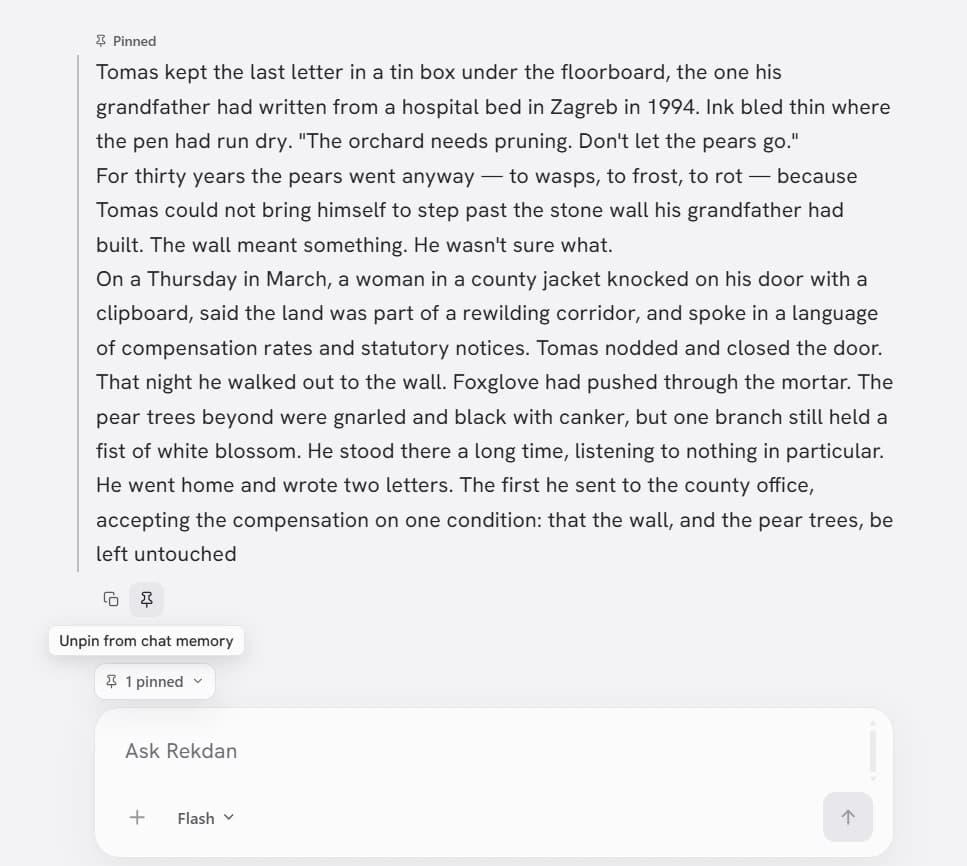
Keep important context with Pin Memory
Pin project requirements, writing instructions, decisions, personal preferences, or important facts so Rekdan can keep them available as the conversation grows.
How it works
A memory you control
Pin Memory is deliberate, user-controlled context. It keeps the facts and instructions you choose available for the whole conversation, instead of making you paste the same background information again.
- Pin a project brief, audience, tone guide, decision, or personal preference.
- Pinned messages are sent as standing context on each turn in the chat.
- Unpin or clear them whenever the project changes.
Who it is for
A focused tool for work that keeps evolving
Carry a thesis question, source requirements, or study goals through a long chat.
Keep a positioning decision, customer profile, or campaign brief in context.
Remember technical constraints, naming decisions, and project requirements.
How it works
Keep the right context in reach
- 01
Choose the message
Find the requirement, decision, preference, or fact that should stay available.
- 02
Pin it to chat memory
Rekdan marks it as standing context and keeps it available as the conversation grows.
- 03
Keep working
Ask new questions without pasting the same background information again.
Why it matters
Less repetition. More continuity.
- Keep tone, audience, and project constraints consistent.
- Reduce repeated setup in long-running conversations.
- Change or remove context when the project changes.
Use it for
- Keep a brand voice guide beside a marketing campaign.
- Remember the technical constraints of a coding project.
- Carry a thesis question and source requirements through research.
- Save a character brief while drafting a story.
The difference
Control the part that matters
Ordinary chat history
The conversation records what was said, but older background can become hard to rely on as new turns accumulate.
Pin Memory
You deliberately mark the context that should remain available and relevant throughout the chat.
FAQ
Questions, answered plainly
- What is Pin Memory in Rekdan?
- Pin Memory keeps selected messages available as standing facts, constraints, and instructions throughout a chat until you unpin them.
- How is Pin Memory different from ordinary chat history?
- Ordinary history is the conversation record. Pin Memory is the small set of context you deliberately mark so Rekdan keeps honoring it as the conversation grows.
- What can I pin?
- You can pin project requirements, writing instructions, decisions, preferences, or important facts from either your messages or Rekdan’s replies.
- Can I remove a pinned message?
- Yes. Unpin one message or clear the pinned context when a requirement, preference, or decision is no longer current.
- Does Pin Memory work across every chat?
- Pin Memory is standing context for the current conversation. It does not silently turn every old chat into one shared memory.
- How many messages can I pin?
- The number of pinned messages available in context depends on your Rekdan plan. The Free plan currently supports up to three pins per chat.