

Tighten one passage without disturbing the structure and voice of the full draft.
AI editing without the rewrite
Edit only the text you select
Select a sentence, paragraph, code block, or part of an AI response and ask Rekdan to revise only that section.
How it works
A precise edit, not a full rewrite
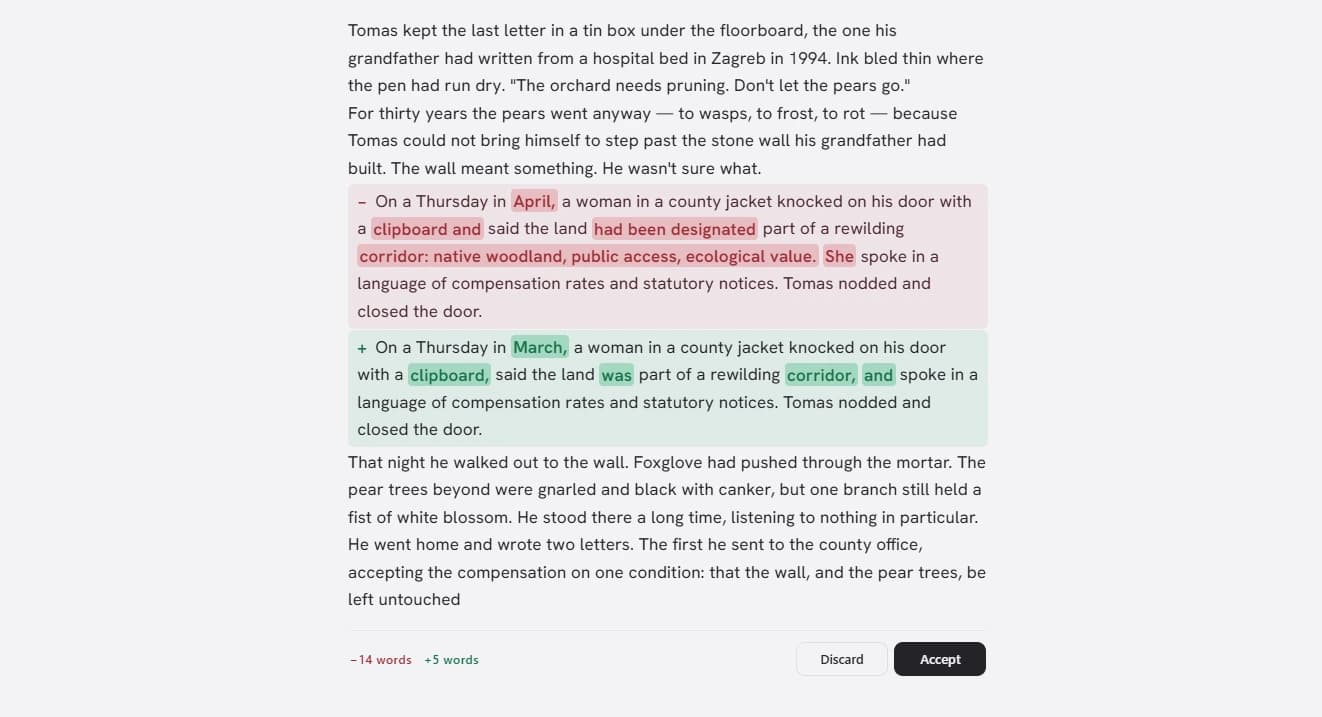
Focused editing keeps the good parts of an answer intact. Select the passage, describe the change, and review a diff before the replacement is applied.
- Select a sentence, paragraph, code block, or part of an AI response.
- Ask for a specific change, such as “make this clearer and shorter.”
- Review the focused diff and accept or discard it without rewriting the whole answer.
Who it is for
A focused tool for work that keeps evolving
Fix or explain a selected function while leaving the surrounding code untouched.
Simplify, clarify, or improve one paragraph without losing the original argument.
Make precise copy changes that are easy to review before accepting.
How it works
Make one precise change at a time
- 01
Select the passage
Highlight the sentence, paragraph, code block, or response fragment you want to change.
- 02
Describe the edit
Ask for a focused change: make it shorter, clearer, warmer, stricter, or fix only the bug.
- 03
Review and decide
Compare the proposed replacement, then Accept it or Discard it while the rest stays unchanged.
Why it matters
Small edits without collateral changes.
- Preserve correct content and formatting around the selection.
- Make small revisions without requesting a full rewrite.
- See exactly what changed before it becomes part of the answer.
Use it for
- Shorten one paragraph without changing the rest of an article.
- Rewrite a sentence for a more confident or friendly tone.
- Fix one function while leaving the surrounding code untouched.
- Simplify a complex explanation for a beginner.
The difference
Control the part that matters
Full rewrite
A broad rewrite can change correct sections, disturb formatting, and make a small fix harder to review.
Edit Selected
Only the text you select is proposed for replacement, with a focused diff and explicit approval.
FAQ
Questions, answered plainly
- Can I edit only part of an AI response?
- Yes. Select the text you want to change, describe the edit, and Rekdan proposes a replacement for only that selection.
- Can I select one paragraph and rewrite it with AI?
- Yes. Select one paragraph, write an instruction such as “make this clearer and shorter,” and review the focused diff.
- Does Edit Selected rewrite the whole document?
- No. Rekdan sends the selected fragment with enough surrounding context to preserve meaning, then replaces only the selected fragment after you accept it.
- Can I use Edit Selected on code?
- Yes. Select a code block or part of a response and ask Rekdan to fix, explain, simplify, or refactor only that selection.
- What happens to the rest of the answer?
- The rest remains unchanged. You can review the proposed replacement before accepting it, or discard it and keep the original.
- What instructions can I give Edit Selected?
- Use precise instructions such as make this shorter, change the tone, explain this simply, translate this, or fix only the error.